
Sync metafield and metaobject definitions and values between Shopify stores.
MetaMaintain keeps metafield and metaobject definitions in sync across your Shopify stores. Analyze what definitions are missing, create them, and keep entries aligned.
7 day free trial
How It Works
MetaMaintain walks you through every step. Nothing syncs without your say.
- 1
Connect your stores
Install MetaMaintain on both your source and destination stores. The source store is your source of truth. Definitions and data flow from it to your destination. Free to install on both; a paid plan is only required to act as the source.
SequenceFrom the source store, enter the handle of the destination store you want to connect. MetaMaintain generates a secure install link tied to that specific store.Connected Store.myshopify.com - 2
Browse and select definitions
Browse every metafield and metaobject definition from your source store. Filter by owner type: products, variants, collections, and more. Expand any definition to inspect its fields, then check the ones you want to sync.
ScenariosMetafields attach structured data directly to Shopify objects: products, variants, collections, and more. Filter by owner type using the tabs, then check the definitions you want to sync.Metafield DefinitionsName One / List Type Care Instructionscustom.care_instructionsOne Multi-line textFabric Compositioncustom.fabric_compositionOne Single line textFit Typecustom.fit_typeOne Single line textSize Guidecustom.size_guideOne Metaobject: Size GuideRelated Productscustom.related_productsList Product reference - 3
Analyze and create missing definitions
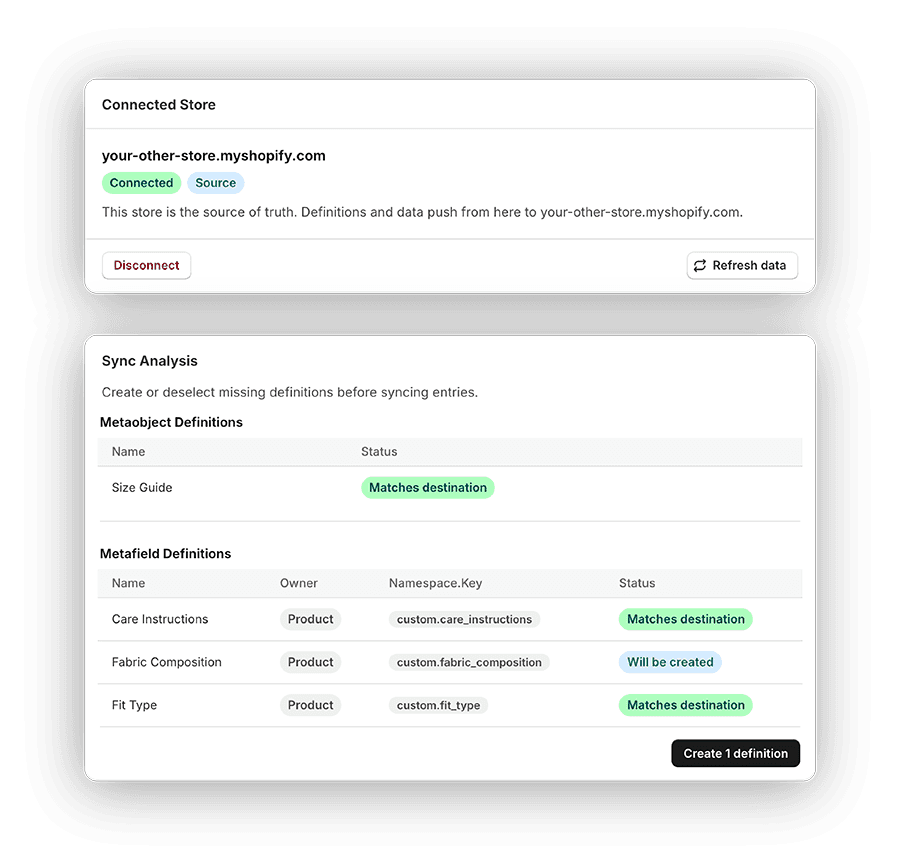
Click Analyze and MetaMaintain compares every selected definition against your destination store, checking structure, type, and each field. Missing definitions can be created with one click. Nothing changes in your stores until you confirm.
ScenariosA missing definition means it doesn't exist in the destination at all. MetaMaintain can create it for you with one click, copying the exact structure from the source store.Sync AnalysisClick Analyze to compare your selection against the destination store.
- 4
Sync your entries
Once all definitions exist in both stores, sync the actual data. MetaMaintain compares every entry, shows you exactly what has changed or is new, and syncs your selection one definition at a time.
ScenariosNew entries exist in the source store but have no counterpart in the destination. MetaMaintain creates them, preserving handles and all field values.Sync EntriesAll selected definitions exist in the destination store. Ready to sync entries.
Metafield DefinitionsName Owner Namespace.Key Care Instructions Product custom.care_instructions
Simple, Transparent Pricing
Free to use as a destination store. A paid plan is only needed to act as the source.
Destination Store
For stores receiving synced definitions and data.
No subscription required
- Connect to a source store
- Receive synced definitions from the source
- Receive synced entries from the source
Source Store
For stores that serve definitions and data to destinations.
Billed $96/year
- Check which definitions are missing in the destination
- Analyze definition structure against the destination
- Create missing definitions in the destination
- Sync entries to the destination
- 7-day free trial included
Available in Multiple Languages
Use MetaMaintain in your preferred language.
- English
- French
- German
- Italian
- Portuguese (Brazil)
- Spanish
Frequently Asked Questions
Everything you need to know before getting started.
Your source store is your source of truth - the store whose metafield and metaobject definitions and data you want to replicate. Your destination store receives those definitions and entries.
Yes. You can install MetaMaintain on a destination store, connect it to a source, browse and analyze definitions, and sync entries - all for free. A subscription is only required on the source store side.
Yes. MetaMaintain includes a 7-day free trial with full access. Install it on both stores and start analyzing right away - no payment required to get started.
Products, variants, collections, and shop metafields are available by default with no extra setup. Customers, pages, blogs, blog posts, and several others are also supported - those just require you to approve additional Shopify permissions when prompted.
The Analyze step compares each selected definition against the destination - checking its type, namespace, and every field. If an exact match exists, it's confirmed. If anything differs or a definition is missing entirely, you're shown exactly what's different before any changes are made.
No changes are written without your explicit confirmation at each step. Analyze runs read-only. Definitions are only created when you click to create them. Entry sync shows you a diff of what will change before you commit. Nothing happens automatically.
No. MetaMaintain syncs metafield and metaobject definitions and entries. If an entry includes a file reference (image, video), the referenced file must already exist in the destination store - the file itself is not copied.
All syncs are manually triggered. There is no scheduled or automatic sync - every action is initiated by you inside the app.
Each owner type has a stable cross-store identifier: products and collections use their handle, markets and locations use their name, customers use their email address, and product variants use a combination of product handle and selected options. As long as those identifiers are consistent between your stores, entries can be matched and compared accurately.
Reference-type entries can be synced as long as the referenced resource exists in the destination store. MetaMaintain resolves references to their actual names or handles - so instead of seeing a raw ID, you see the filename, product handle, or page handle. If the referenced resource doesn't exist in the destination, that entry is flagged and skipped rather than synced with a broken reference.
Definitions (the field structure) can be created in your destination store. However, syncing individual order and draft order values is not supported. Orders use sequential numbers that differ between stores, so there is no stable cross-store identifier to match a source order to its destination counterpart.
Yes. If a definition is pinned in your source store, MetaMaintain will pin it in the destination store after creating it. The exact position may differ since Shopify assigns pin order automatically, but pinned definitions will remain pinned.
We offer email support to help you get the most out of MetaMaintain. Reach us at metamaintain@sizzlecentral.com and we'll get back to you as soon as possible.
Have another question? Get in touch.
Stop recreating definitions by hand.
Connect your stores, analyze what's missing, and keep your metafields and metaobjects in sync. Takes minutes to get started.
Install MetaMaintain7 day free trial · Free to install on destination stores